
There is more written advice about prompting Seedance 2.5 than about any other part of the model. ByteDance publishes a guide through Dreamina. So do fal.ai, OpenArt, Higgsfield, Morphic and Rendley. Reddit threads promise the mistakes you are making. Read enough of them and something odd shows up.
They agree almost completely on the shape of a prompt, and they disagree by a factor of eight on how long it should be.
That is not a small gap. One widely-shared post says 50 to 80 words. A prompting guide in the Higgsfield orbit says 150 to 300. Higgsfield's own guide says "as long as the scene needs." Meanwhile the prompts people actually publish alongside their results run past 400 words routinely.
There is a number that settles the argument, and it is sitting in an API reference nobody links to.
The shape everyone agrees on
Start with the agreement, because it is real and it is useful. Strip the branding off six independently published guides and the same four-part structure appears in all of them:
| Part | What goes in it | Recommended by |
|---|---|---|
| Asset manifest | Each reference labelled and given exactly one job — @Image1 is the face | Rendley, Higgsfield, fal.ai, Morphic |
| One-line summary | Subject, location, event, style and camera compressed into a single sentence | Higgsfield-derived community templates |
| Timed beats | The clip sliced into ranges, one primary change per range | Dreamina, OpenArt, fal.ai, JXP |
| Global rules | What must stay constant, and what is banned | Dreamina, Higgsfield, Rendley |
The ordering logic is the same everywhere: identity anchors first, then the plan, then the constraints that apply across the whole clip. The stated benefit is also the same — you can rewrite one beat, or one rule, without disturbing the rest.
ByteDance's own guidance, published through Dreamina, frames this as writing like a director rather than stacking adjectives, and gives a canonical field order: format, subject, action, environment, camera, look, timing, audio, constraints. fal.ai calls its variants "shapes" and lists four — a cinematic one-liner, a bracketed field block, staged beats, and a timed shot list — recommending the last two whenever later events depend on earlier ones.
If you take nothing else from this article, take the four-part skeleton. It is the closest thing to a consensus that exists for this model.
The disagreement nobody resolves
Now the part where the guides come apart. Here is what each source recommends for the length of a prompt driving a 30-second clip:
| Source | Recommended length |
|---|---|
| r/generativeAI, "I've wasted a lot of Seedance credits" | 50–80 words |
| A Seedance 2.5 prompt guide in the Higgsfield orbit | 150–300 focused words |
| Higgsfield's own prompting guide | "As long as the scene needs" |
| Prompts published with their results on X | 400+ words is typical |
The Reddit author is specific about why short works, and the reasoning is not silly:
The ideal length I discovered is between 50 and 80 words, formatted with the subject and action in the first sentence, camera and style in the second, and constraints in the third.
The same post reports that combining camera movements leads to jitter — one move per clip, not three. That claim is consistent with what we measured in our cinematic-prompt guide, where kinetic camera vocabulary turned out to be the part of the film-school glossary the model reliably ignores.
But 50 to 80 words cannot hold a manifest, a summary, four timed beats and a global-rules block. The advice and the structure everyone recommends are not compatible. Something has to give.
The number that settles it
Cloudflare's Workers AI model reference for Seedance 2.5 documents the request schema, and the text field carries a hard constraint:
stringmaxLength: 2000 — Text prompt describing the video to generate. Optional when at least one reference image, video, or audio clip is provided.
Two thousand characters. Not words. And the second sentence is worth reading twice: with references attached, the prompt is optional entirely, which tells you where this model expects appearance information to come from.
Two thousand characters is roughly 300 English words at the 6.7 characters-per-word average of real prompts. So the budget adjudicates the disagreement cleanly:
- 50–80 words: fits, with 75% of the budget unused
- 150–300 words: fits, using most of it
- 400+ words: does not fit
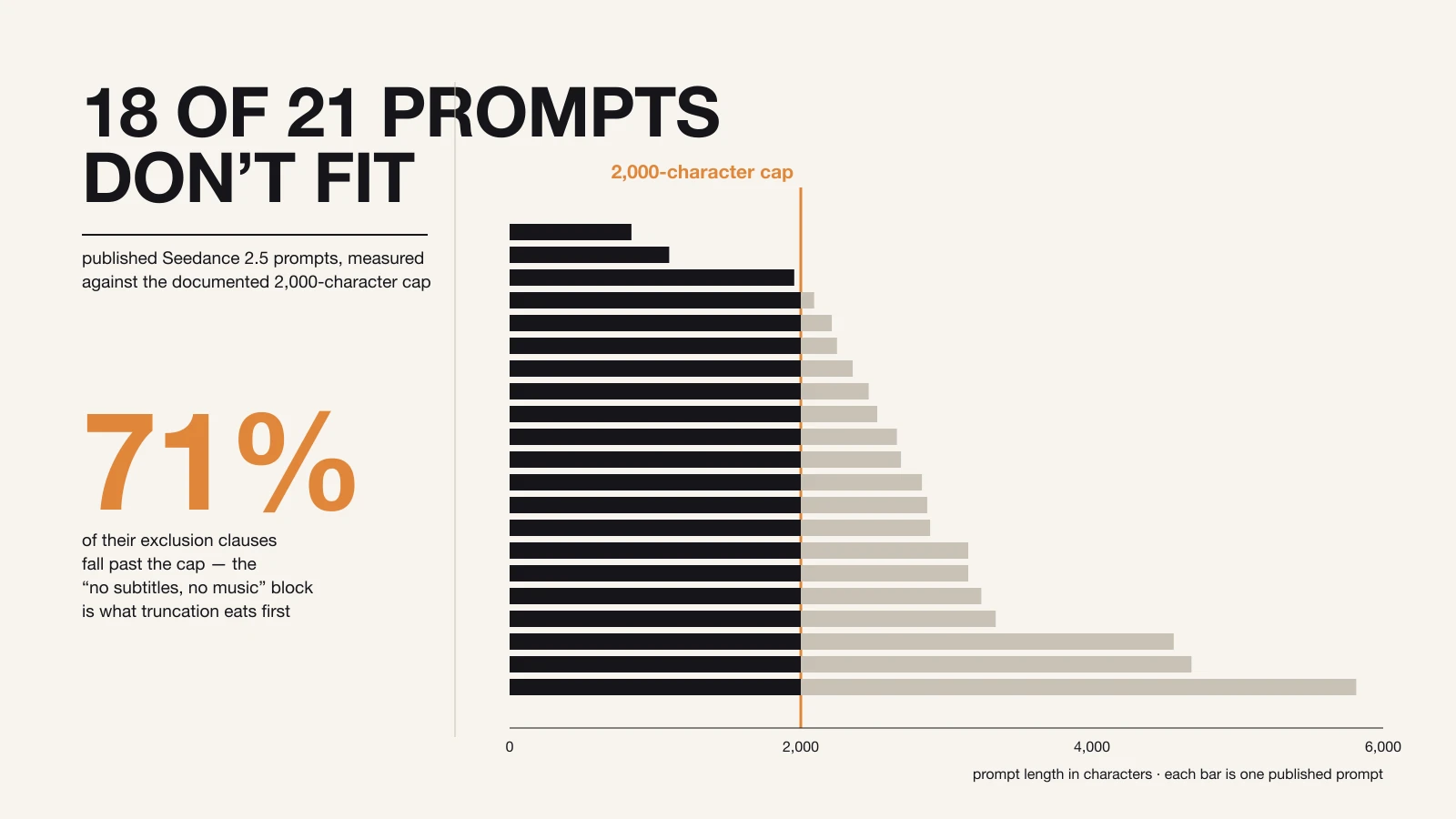
That last line is not hypothetical. We had a corpus already measured for the two previous articles in this series — 21 published Seedance 2.5 prompts, each collected with the video it produced. Running the character counts against the documented cap:
| Measurement | Result |
|---|---|
| Median prompt length | 2,688 chars |
| Prompts that fit inside 2,000 characters | 3 of 21 |
| Prompts within the 50–80 word advice | 0 of 21 |
| Longest prompt in the set | 5,815 chars |
Eighteen of twenty-one published, working, widely-copied prompts are over the documented limit — the median one by 34%.
What gets cut first
This is the part that matters, and it follows from something we measured in the first guide in this series: the constraints go at the end. Every guide recommends it, and practitioners do it — the global-rules block is a closing move.
Which means a prompt truncated at character 2,000 loses its constraints before it loses anything else. In the 18 over-budget prompts:
- 16 would lose at least one exclusion clause to a hard cut at 2,000 characters
- 89 of their 125 exclusion clauses — 71% — sit past character 2,000
So the failure mode is specific and nasty. You paste a 3,000-character prompt from X into an endpoint that caps at 2,000. The scene description survives. The no subtitles, no background music, no on-screen text block does not. You get your shot, with burned-in captions and a stock score over it, and you conclude the model ignores negative instructions.
One caveat, stated plainly: 2,000 characters is documented for Cloudflare's endpoint. We could not verify published limits for fal.ai, Replicate, BytePlus/Ark or Kie.ai, and none of the documentation we found describes what happens on overflow — whether a long prompt is rejected loudly or trimmed quietly. Treat 2,000 as the number to design against until your platform tells you otherwise, and if a long prompt behaves as though its last paragraph never arrived, that is the first thing to test.
The 12 rules
With the budget established, the rest of the published advice sorts itself into twelve rules. Where sources disagree, that is noted.
Structure
1. Write a brief, not a description. ByteDance's own guidance is to write like a director: subject, action, environment, camera, look, timing, audio, constraints, in that order. The failure it is aimed at is the adjective pile — three sentences of "cinematic, stunning, ultra-detailed, breathtaking" that consume budget and specify nothing.
2. Spend characters on what a reference cannot carry. OpenArt puts this best: save words for the action, the camera move and the timing. A face, a wardrobe, a product's geometry and a colour palette all travel better as reference images than as prose, and the API treats the prompt as optional when references are present. Every sentence describing something visible in an attached image is budget spent twice.
3. Give each reference exactly one job, by name. @Image1 is the main character's face; ignore the background and the other people. Numbers must match upload order. The corresponding failure — features blending between two similar character references, or a studio backdrop leaking in from a product shot — is one of the most reported problems with this model, and it comes from unassigned or double-assigned references.
4. Never burn labels into a reference image. Names, arrows and annotations drawn onto a reference get read as part of the scene, and can be reproduced as on-screen text or duplicated characters. Declare the mapping in the prompt instead.
Timing
5. Give every beat one primary change, and name the end frame. This is the single most repeated piece of advice across every guide. An overstuffed range gets its middle actions dropped; an empty range gets filled with whatever the model feels like.
6. Use whole seconds and leave no gaps. 0–8s, 8–16s, 16–24s, 24–30s — the next range picks up exactly where the last one ended. OpenArt is explicit about avoiding fractional values and about coverage: a silent range is an invitation.
7. Lock the opening and the closing beat hardest. Appearance drift traces back to an under-specified opening; chaotic endings trace back to an undirected final beat. Opening with a stable framing on a clearly described subject gives the model its anchor, and naming the final image stops it from improvising a resolution.
Audio
8. Put dialogue in double quotes, and name the language first. The convention that has settled across fal.ai's and OpenArt's guidance: English, British accent, calm narrator: "This is our story." Quoted text is what triggers lip-synced speech; the language tag is what stops an English line from being delivered in Chinese. Keep lines short — long speeches degrade both delivery and mouth motion.
9. Say what the audio is not. Silence in the prompt is an instruction to improvise, and the model's improvisation is generic background music. No background music, ambient street sound only is the standard guard, and unwanted score is second only to burned-in subtitles as a reported annoyance.
Constraints
10. Keep the ban list in one block at the end. Constraints buried mid-prose get treated as scene description. Isolated in a closing section they read as global. no subtitles, no bgm, no fast cuts has become the community shorthand for a reason.
11. Never let a beat contradict a global rule. If the rules say no cuts and beat three says "cut to a close-up," the specific instruction usually wins and the global rule is broken. Rewrite the beat — a push-in instead of a cut — rather than hoping the model resolves the conflict in your favour.
12. Change one variable at a time. When a generation misses, name the single thing that failed — motion, camera, identity, lighting, audio or continuity — and change only that. Rewriting the whole prompt destroys the information in the previous attempt. This is the rule most likely to save you actual money, since a failed 30-second generation is not free.
Where the sources still contradict each other
Four disagreements are worth carrying with you, because none of them is settled and each will cost you a generation if you assume the wrong side.
Prompt length. Covered above. The 2,000-character cap makes 150–300 words the defensible target, but note that the shortest prompt in our corpus — a finished commercial shot — is 837 characters, and the Reddit author's 50-to-80-word range is genuinely good advice for a single-beat clip. Length should track how many things must be held in place at once, not ambition.
Resolution. This one is a mess. ByteDance's launch material described native 4K with 10-bit colour. Higgsfield's product page advertises native 1080p with 4K upscaling. Third-party write-ups inspecting a live deployment report the resolution options actually exposed were 480p and 720p only. We could not verify any of these independently, and they may all have been true at different times. Check the dropdown on the platform you are using before you write 4K into a prompt — and note that resolution is a generation setting, not a prompt instruction. We measured this in the previous article: a prompt asking for 4:3 aspect ratio came back 9:16, because the dropdown wins.
Negative phrasing. Google's Vertex AI video prompt guide tells you not to do it: "Not recommended: using instructive language or words such as 'no' or 'don't'." That advice is written for a model with a dedicated negative-prompt field, where bare nouns go in a separate box. Seedance 2.5 prompts in the wild have no such field — the exclusions live inline in the prompt body, and every Seedance-specific guide tells you to write them that way. Do not carry Veo's advice across.
How many references. The model accepts up to 50. Guides converge on one to eight primary subjects being more stable than dozens, and on five to ten seconds being a better video reference than a longer clip. More references is not more control; it is more opportunity for misbinding.
Before you copy any prompt
A short pre-flight list, which is really the article compressed:
- Count the characters. If it is over 2,000, it may not arrive intact.
- Check what would be cut. It is almost always the constraints block. Move it up, or trim the scene description to make room.
- Move appearance into references. Every sentence describing a face frees characters for timing.
- Check the resolution and aspect ratio dropdowns. They override the prompt.
- Confirm the duration your platform allows. A 30-second timeline pasted into a 10-second endpoint wastes every beat past the cutoff.
The 12 rules, in one place
- Write a director's brief, not a description
- Spend characters on what a reference cannot carry
- Give each reference one job, by name
- Never burn labels into a reference image
- One primary change per beat, and name the end frame
- Whole seconds, no gaps
- Lock the opening and closing beats hardest
- Dialogue in double quotes, language named first
- Say what the audio is not
- Ban list in one block at the end
- Never let a beat contradict a global rule
- Change one variable at a time
The two that carry the most weight are 2 and 10 — move appearance into references, and protect the constraints block — because both are really the same rule seen from different ends. You have 2,000 characters. The parts of your prompt that get cut are the parts you wrote last, and the parts you wrote last are the ones stopping the model from adding subtitles, music and text you never asked for.
If you want somewhere to test the budget, our Seedance 2.5 generator takes text, image and audio references, and new accounts get free credits — enough for the one-variable comparisons rule 12 asks for. Text-to-video is the place to start; pricing covers what a longer run costs.
For the prompt anatomy underneath these rules, see how to prompt Seedance 2.5. For the camera and lighting vocabulary that survives contact with the model — and the much larger part that does not — see how to write cinematic Seedance 2.5 prompts.